GCP Free Tier Hurdles
Everything I learned the hard way running a single e2-micro VM on GCP’s free tier. The “free” VM ended up costing ₹58 for 8 days — here’s why.
1. Region Lock — Free Tier Only in US
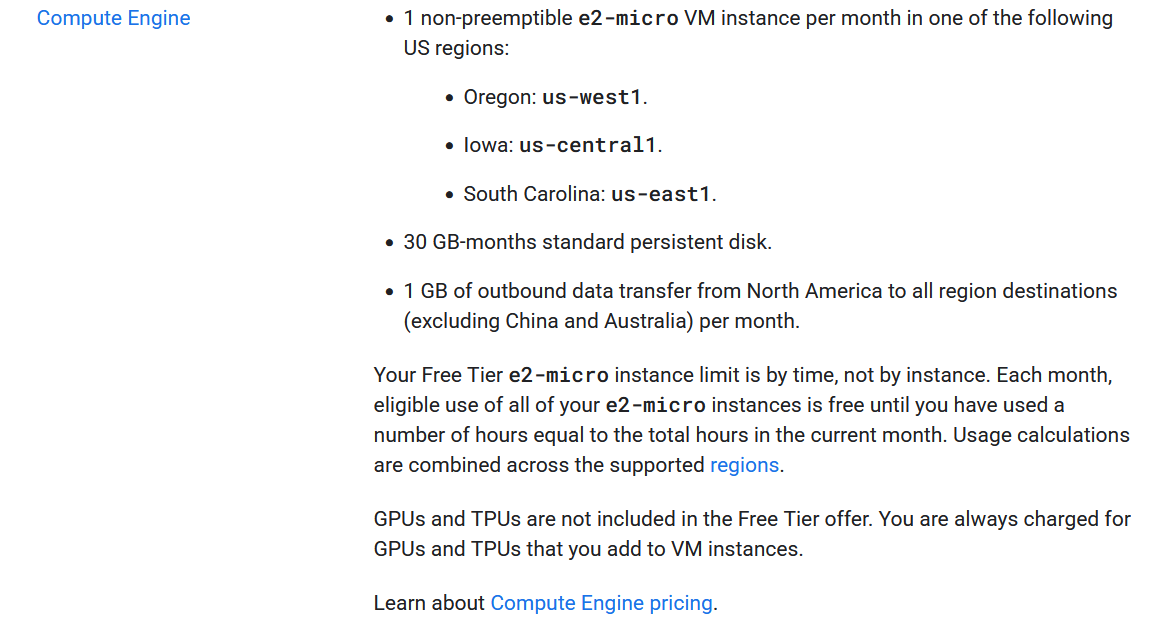
The e2-micro is free only in us-west1, us-central1, and us-east1. Pick any other region (like asia-south1 Mumbai) and you’re paying ~₹4/day just for compute.
Lesson: Always check free tier region list before creating a VM.
2. Boot Disk Defaults to pd-balanced (NOT Free)
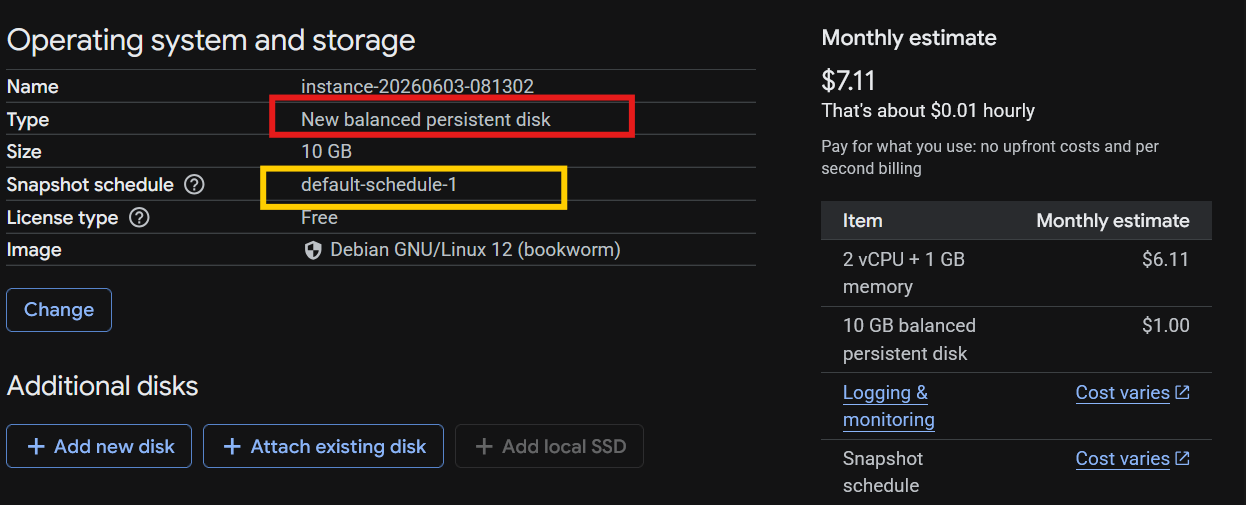
Free tier covers 30GB of standard HDD (pd-standard). The Console defaults to pd-balanced which costs ~₹84/GB/month. A 10GB disk = ~₹22 for 8 days.
Lesson: Switch disk type to pd-standard (standard persistent disk) during VM creation.
3. Scheduled Snapshots Auto-Enabled
This is the trap that got me ₹44 of the ₹58 bill. GCP enables daily snapshots by default during VM creation. Did I consent? Probably clicked through. The schedule:
- Every day
- Multi-regional (expensive)
- Auto-delete after 14 days
Cost: ₹30 for upload + ₹14 for storage = ₹44 for 8 days.
4. Multi-Regional Snapshots Are Expensive
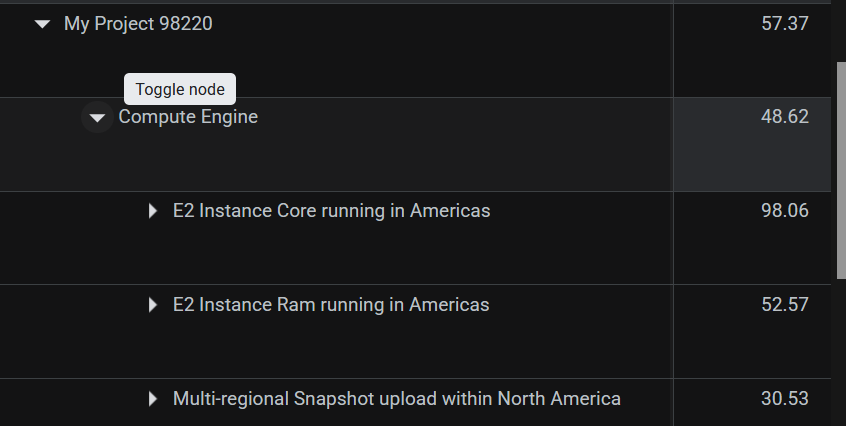
A standard (regional) snapshot of the same 16GB disk would cost ~₹8/month. Multi-regional was ₹50+/month. The difference is massive for no real benefit on a dev VM.
Lesson: Always pick standard (regional) snapshots, not multi-regional.
5. VM Manager (google-osconfig-agent) Adds ₹11/mo
Enabled by default on every VM. It’s a Google-managed OS config agent for patching and compliance — useful for enterprise, useless for a personal dev VM. Costs ~₹11/month.
Lesson: Disable it: GCP Console → VM → Edit → Observability → disable.

6. 1GB Free Egress Runs Out Fast
Free tier includes only 1GB/month network egress. Running a dashboard, cloning repos, pulling Docker images — all consume it. I had a dashboard on port 9119 that I killed purely to save egress.
Lesson: Monitor egress early. I installed a cron to warn at 80% usage.
7. No UPI for Small Bills
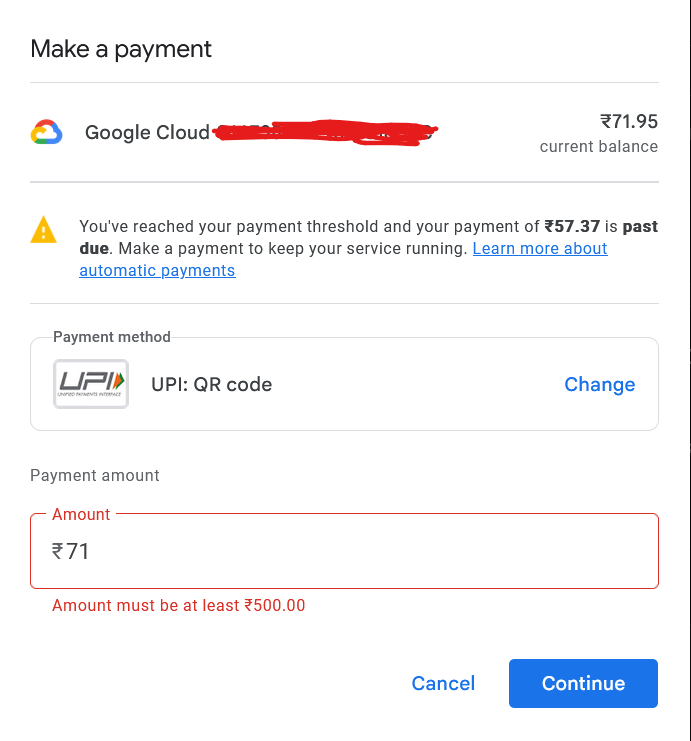 GCP minimum UPI payment is ₹500. My ₹58 bill couldn’t be paid via UPI. Had to use a debit card. Small amounts are a hassle.
8. Service Account Scopes Are Permanent
Once the VM is created, you can’t change its service account scopes. My Hermes VM has a compute service account with insufficient scopes — so gcloud compute and gcloud billing commands fail with “Request had insufficient authentication scopes” forever. Everything has to be done via the Console.
Lesson: Set wider scopes (or use a service account key) at VM creation time if you plan to manage GCP from the VM.
9. Free Tier Credit Cap
The free tier gives you a ₹69/month credit pool. If your VM runs the full month, the credit may not cover all compute hours — especially if you have other resources in the same month.
10. Billing Console is Confusing
The summary says ₹117.83 → ₹69.21 credit → ₹48.62 + ₹8.75 tax = ₹57.37. But the cost table shows the real breakdown — compute was ₹0 after free tier, the actual cost was snapshots + egress. Easy to miss what’s really charging you.
Lesson: Always check the Cost Table (per-SKU breakdown), not just the summary.
11. Snapshot Schedule Can’t Be Deleted While “In Use”
You have to:
- Detach the schedule from the disk first (disk → edit → set schedule to None)
- Then delete the schedule
- Then delete the actual snapshots separately
Three-step process for something that shouldn’t exist by default.
12. The “Free” VM is Free-ish
Net of all traps: once you disable snapshots, switch to HDD disk, disable VM Manager, and live within 1GB egress — the actual monthly cost is ~₹8-10 (egress + tax). The rest is genuinely free.
But GCP doesn’t make it easy to get there.
Summary: Cost Before vs After Fixes
| Item | Before (₹) | After (₹) |
|---|---|---|
| Compute (e2-micro) | ₹0 (free tier) | ₹0 |
| Disk (pd-balanced → pd-standard) | ~₹22 | ₹0 |
| Snapshots (multi-regional) | ₹44 | ₹0 |
| VM Manager | ~₹3 | ₹0 |
| Egress | ₹4 | ₹4 |
| Tax | ₹9 | ~₹4 |
| Total | ~₹82 | ~₹8 |
Moral: GCP free tier works, but you have to fight it into submission first.